
Find / SEARCH
Named queries over Gerrit and Jira, not private shell recipes.
Do / EXECUTE
Agents as bounded workers with a role, a sandbox and a lock.
Supervise / ASK
A run that needs a human waits for one. It does not pretend to be done.
Keep / CLEAN
Dry-run-first hygiene that skips whenever the evidence is unclear.
Code Got Cheap
There is a famous saying in India about men: you aren’t as good as your mom believes, and definitely not as bad as your wife thinks. AI agents deserve the same treatment. They are neither the miracle nor the disappointment that people on each side insist on.
Jokes aside, after running agents hard for almost a month, crossing 150 million tokens a day at peak, I found myself asking a different question. Are we doing any real retrospection on how we use them? There is always a cost: tokens, CPU, network, disk space and the single most valuable asset we have, which is time.
A year or two ago, the slowest part of a change was writing it. That is no longer true. With a capable coding agent, a first draft of a function, a test file or a refactor takes minutes. Engineers who use these tools well produce more diffs per week than they ever did, and the ones who push hardest discover where the limit really is.
The limit is not the typing. It is everything wrapped around the typing. A reviewer still reads at human speed, so if authors produce twice the diffs the queue simply grows. An engineer who can drive three changes in parallel now has three worktrees, three tickets, three sets of comments and three build caches to keep straight. Merged worktrees, stale Bazel caches and journald logs pile up faster when you build faster. And everyone quietly invents their own glue: a private heap of shell aliases, cron lines and half-remembered Gerrit queries that nobody reviews and nobody can borrow.
The engineers who do well here are not the ones who type prompts fastest. They are the ones who treat the workflow around the code as something to engineer.
Hukum Sa! is one engineer’s answer, built for a team that lives in Gerrit, Jira, Bazel monorepos and agent CLIs. The name is a small joke. Hukum means “command” or “order” in Hindi and Rajasthani, and Sa is a respectful suffix. Together it roughly means “As you command, Sir.” You give the order, it carries it out, and it stops to ask when the order is ambiguous.
The Habit
Ask an agent to “find my open reviews that are waiting on someone else and summarise them” and, most days, it gets there. It works out how to query the review system, tries a command, reads the output, fixes a flag, tries again, parses the result and writes a summary. Ninety seconds and a few thousand tokens later you have your answer. Tomorrow you ask the same thing and it works it all out again, slightly differently.
Nothing is broken. The agent is doing what it is good at: figuring things out. The trouble is that I asked it to figure out something that was already figured out last week. That is where the habit that changed how I work with agents comes from.
It rests on a simple split. Most engineering chores fall into one of two buckets.
Is this change safe to merge? Which of three approaches fits the constraint? Why did this test start failing? These need reading, weighing and context. This is where an agent earns its keep.
List the changes I own with unresolved comments. Remove worktrees whose changes have merged. Trim logs older than a month. Post the digest. The steps and inputs are known, and the correct output is a pure function of the state of the world.
When an agent does mechanical work, you pay for judgment you did not need. You also get judgment you did not want: a slightly different query today, a slightly different filter tomorrow, a creative interpretation of “older than a month.” When a command does it, you get the same answer every time, in milliseconds, for free. The agent then spends its attention on the part that is actually hard.
The way I got here was a retrospective, not a design. These are the seven questions I started asking myself.
1. How much of the work was sheer repetition?
2. Is the repetitive work judgmental or mechanical?
3. What percentage of mixed work actually needs an agent?
4. Does the judgmental work follow a pattern or structure?
5. Can the mechanical work be turned into commands?
6. Can I safely work on multiple things in parallel?
7. What about the sandbox leftovers and stale caches the agents leave behind?
Question 5 gave me the commands, question 6 gave me a worktree per ticket, and question 7 gave me scheduled cleanup. Question 4 is the quiet one: judgment that follows a pattern, like a code review, can still be packaged as a named routine, with the agent supplying the thinking in the middle.
What You Get When Chores Become Commands
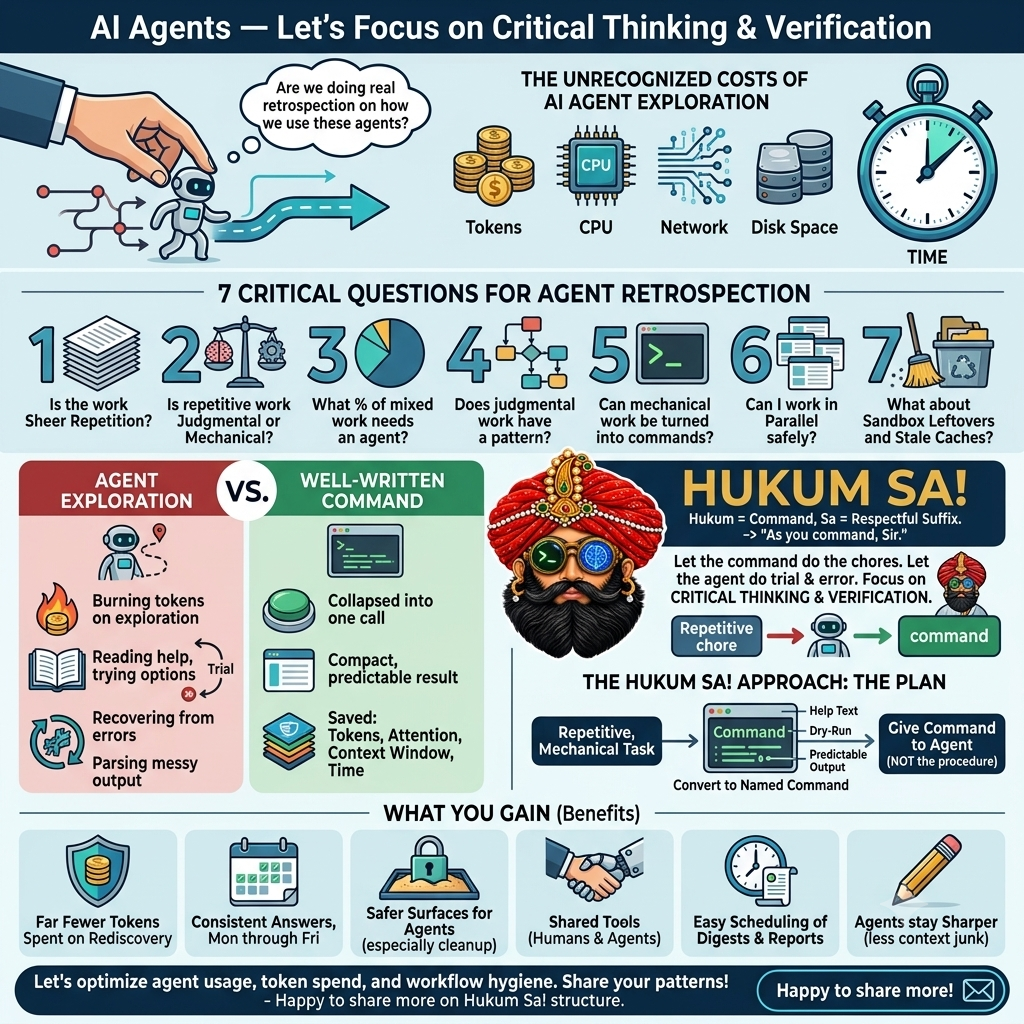
I expected savings in cost and speed. The benefits turned out to be larger than that, and several of them are about trust.
1. Fewer tokens, less waiting
An agent that rediscovers a procedure burns tokens on exploration: reading help text, trying options, recovering from errors, parsing messy output. A command collapses all of that into one call with a compact result. The saving is not only money, it is also context window. Every wrong turn an agent takes sits in its context for the rest of the session and slightly degrades what it does next. The saving is not only money. It is attention, it is context window and, most of all, it is time.
2. The same answer on Monday and on Friday
Agents are non-deterministic by design. That is a feature when the task is open-ended and a defect when the task is “count the stale builds.” A command gives you a stable floor. The agent can still vary how it explains things, but the facts underneath do not move.
3. You can test it, and you can fix it once
A script has a known input and a known output. You can run it against a fixture, put it through review and fix a bug once for everyone. An agent’s improvised procedure has none of that, so when it gets something subtly wrong the “fix” is a better prompt and a hope. It also changes who can contribute: a teammate who would never edit a prompt will happily fix a flag in a command.
4. A safer surface for powerful agents
This is the benefit I underrated most. An agent with a raw shell can do anything the shell can do, which on a machine holding your credentials and build caches is a little unnerving. A command line tool is a narrower door. The agent is told it may call cleanup, search or report, and each of those has its own rules baked in. The cleanup commands are the clearest example: each has conditions that must all hold before anything is deleted, plus a dry run that shows what would go, and “force” is ignored on the dangerous paths.
A prompt asks the agent to be careful. A command makes it hard to be careless.
5. Humans and agents share the same tools
The same search the agent calls is one I type at the terminal. The same digest that lands in the team channel at nine is the one I run by hand to check it. When the agent reports something odd, I reproduce it with one command rather than reading its transcript.
6. It works with whichever agent you use
Agents change quickly. A command line tool does not care which one is calling it. The tool is the stable part of the system and the agent on top is replaceable, so moving between agent products, or running two side by side, costs almost nothing. The useful knowledge lives in the tools, not in any one vendor’s configuration.
7. Scheduling becomes trivial
Anything that can be a command can run on a timer: a nightly cleanup, a morning digest of reviews waiting on you, a weekly report on unresolved tickets. They run whether or not you remember, whether or not an agent session is open, and without a language model in the loop unless one is needed.
Where the agent fits
None of this is an argument against agents. It is an argument for using each thing for what it is good at.
| The command does | The agent does |
|---|---|
| Fetches and filters the list of work | Decides which item deserves attention first |
| Sets up an isolated workspace for a ticket | Writes the change inside it |
| Collects the facts of a review | Weighs them and forms an opinion |
| Formats and posts the digest | Explains an unusual entry in it |
| Cleans up when work is merged | Nothing. It should not need to. |
There is a third column the table leaves out, and it is the one I care about most. The command does the chores and the agent does the trial and error. That frees you for critical thinking and verification: reading the findings, questioning the diff, deciding whether the evidence is enough to merge. Cheap code makes that the scarce skill. It is why the reviewer profile produces findings only, why a run that needs an answer waits for a human, and why every verb that acts has a dry run. The tooling is built so that your attention lands on the part only you can do.
The most useful pattern is the pipeline: a command gathers and narrows, an agent reasons over the small, clean result, and a command acts on the outcome. A related pattern is letting the agent run a named routine rather than invent one. “Review this change” can map to a fixed sequence of steps that always starts the same way and always ends with a report in the same shape. The agent supplies the judgment in the middle, and the scaffolding around it does not vary.
A Day With It
hukumsa is a single command line tool. Python holds the logic: connectors, task runner, workflow engine, sessions, notifications. Bash holds the host-level work, which is mostly git, du, find and sudo. One verb surface, one config tree under ~/.config/hukumsa/, one place for logs. These are real commands from its own help.
$ hukumsa morning # attention queue, then the Slack digests
$ hukumsa review-mine -d # dry run: what would a review pass do?
# deep work on one change
$ hukumsa review 986434
# switching context: one worktree per ticket
$ hukumsa workspace create eng-741602 --project cloud-adapter
$ hukumsa workspace switch eng-741602
# something is waiting on an answer
$ hukumsa session list --awaiting
$ hukumsa session answer cr-1022002 -- 'Confirm all as fix; proceed; stop before push'
# evening: the host cleans itself
$ hukumsa cleanup all -d
None of these is clever on its own. The value is that they share one config, one log layout, one dry-run convention and one way of being scheduled. The digest that lands in the team channel at nine is the same one I run by hand to check it, and it looks like this. Everything in it is computed, not guessed.
1030412 · ENG-1042 Handle untagged snapshots in restore
1030977 · ENG-1051 Refill region cache on expiry
1031200 · ENG-1038 Retry token refresh with backoff
Now the agent gets involved, but only where it adds something. “Review the oldest one” hands it a precise target. It does not hunt for the change, work out which patchset is current or find the comments. It starts reasoning straight away, on a clean slate. Pipelines in Hukum Sa! are YAML files whose stages are just more hukumsa commands, so anything I can run by hand I can compose, and anything I compose I can schedule.
Agents as Bounded Workers
This is the part that matters most for teams adopting coding agents. An agent in Hukum Sa! is not a hard-coded call. It is a small JSON profile: which executable, which workspace, which model, whether writes are forced, and a role preamble prepended to every prompt. Seven ship built in, and they differ in what they are allowed to do.
| Profile | Role | Sandbox |
|---|---|---|
reviewer | Findings only. Never edits, amends or uploads. Never grants labels. | on |
analyst | Read-only investigation. Stops and asks on product decisions. | on |
planner | Work items, file lists, test plans. Does not implement. | on |
developer | Implements, resolves conflicts, runs unit tests, uploads. | off |
verifier | Runs gates and tests, fixes only what is needed to pass. | off |
(bookkeeper and default make up the seven.) That is least privilege for agents. A review does not need write access, so it does not have it, and the sandbox flag enforces that rather than the prompt alone. A favourites map routes the work: run the implement skill and you get the developer profile, run a review and you get the sandboxed one. I never pick an agent per run.
Two unglamorous features earn their place. First, agents often exit with status 0 after writing “I need your confirmation before editing.” A naive runner records that as success. Hukum Sa! scans for stop-and-ask signals, classes the run as awaiting, keeps the chat id, and lets me reply into the same conversation with session answer. The agent resumes with its full context. Second, every run takes an exclusive in-flight lock keyed on the change and its ticket, so a cron job and a human never start two agents on the same CR. Anyone who has watched that happen and counted the duplicate comments will understand.
The Paranoid Cleanup
Parallel work and agents leave debris. Every worktree has its own Bazel output base, and those are large. Every agent session leaves a sandbox, a cache and logs. A dev machine fills up over weeks, and then a build fails at an inconvenient time with a message about disk space. The design rule, stated in the scripts themselves, is that everything removed must be regenerable, and when the evidence is unclear the answer is to skip.
Deleting a worktree is the one action that could lose unpushed work, so cleanup workspace is the most conservative target. It removes a tree only when every check holds: it is a linked worktree named eng-, its branch is attached and matches, the tree is clean, the base ref fetched successfully, it has commits of its own, every ticket-scoped commit carries a Change-Id, and Gerrit reports each of those as MERGED. Open, abandoned, unknown, ambiguous and error all mean skip.
It runs on a schedule, and it is quiet by default. The report messages Slack on failure, or when it reclaimed at least 1 GiB, and stays silent otherwise. A job that always pings gets muted. The workspace layer lets me run as many items in parallel as I can think of. The cleanup layer is what lets me keep doing that on the same machine next month.
The Four Inputs, Again
In When Intelligence Becomes Programmable I argued that productivity demands adaptability, adaptability demands confidence, and confidence is built from four inputs. A change-management workflow supplies them at the level of one ticket. Hukum Sa! supplies the same four one layer down, at the level of the machine and the day.
| Input | What Hukum Sa! gives it |
|---|---|
| Observability | Progress logs and live agent output kept apart, session records with chat ids, digests that show a quiet morning as a quiet morning. |
| Experimentation | A worktree and a Bazel output base per ticket, with a shared disk cache, so a trial is cheap to start and safe to throw away. |
| Control | Role profiles, sandbox policy, dry run on every verb that acts, locks, and a run that waits when a human is needed. |
| Evidence | Done markers keyed on change and patchset, cleanup skip reasons, and the logs to measure time to first review and share of runs ending awaiting versus done. |
The two layers meet where the change-management stages run. Assess runs under the read-only analyst profile, implement under developer, review sandboxed. Those role boundaries are what make it reasonable to let a stage run unattended.
Where It Stands
Stated plainly, so nobody is surprised. It is version 0.0.1. The command surface is stable enough for daily use and the internals are still moving. Connectors exist for Gerrit over SSH and Jira over REST, notifications go to Slack, and the default agent is the Cursor Agent CLI. Plugging in another agent means matching a small contract or writing a shim, though the skills themselves are portable. The detection of “agent is waiting” is a heuristic, state is per host with no shared dashboard, and scheduling leans on plain cron. The toolkit is Apache-2.0, with the squad-specific pack as the proprietary exception.
Agents are still agents. The tool constrains and records what they do. It does not make their output correct.
That is exactly why the review skill, the gates and the human-answer loop exist.
How to Decide What Becomes a Command
Do not begin by building a platform. Notice the third time someone pastes the same fifteen-line shell recipe into a chat with an agent, and turn that into a command. I use four questions, in order.
1. Have I, or has the agent, done this more than twice? Repetition is the first signal.
2. Is there a single correct output for a given state of the world? If yes, it is mechanical.
3. Would a mistake be expensive or hard to undo? If yes, move it out of the prompt and into code, with a dry run.
4. Would I want to run it myself, or on a schedule? If yes, it deserves a name.
If the answers are mostly yes, write the command. If the task needs reading, weighing or creativity, leave it to the agent, and give the agent the commands as building blocks.
A few habits make these tools pleasant for agents as well as for people. Keep the help text short and honest, because the help is the agent’s manual. Put a dry run on anything that changes state. Make the output compact and predictable, and the exit behaviour clear. Name commands like verbs: search, prepare, review, cleanup.
Start small. Give the first recipe a name and a line of help, and next week do the same with the next one. In the first week of using Hukum Sa! itself, run everything with -d, read the logs, then schedule one job and add a second only after the first has run cleanly for a few days. After a couple of months you have a small vocabulary of verbs that both people and agents use, and new work goes faster because most of it is assembling things that already behave. Agents become more reliable, not because the models improved, but because you stopped asking them to improvise what did not need improvising.
The Takeaway
AI made writing code cheap. What stays expensive is attention, trust and the long tail of chores around the code. Spend the machine’s determinism on the chores and the agent’s effort on the trial and error, and keep your own attention for the thinking and the verifying.
Let the command do the chores. Let the agent do trial and error. Let us focus on critical thinking and verification.
I am sharing this because I suspect many of us are quietly burning the same cycles. If you have been reflecting on agent usage, token spend or workflow hygiene, I’d love to hear what patterns you are seeing. Happy to share more about how Hukum Sa! is structured if it’s useful.
linkedin.com/in/pradeep · Pune, India